Dear clients,
it's been a while since the last CrewBrain update, and we've used the time to completely overhaul a major area of the system: base data management.
CrewBrain grows almost monthly with new features and many of them have to be configured or recorded in the base data profiles. This has led to very long profiles in the base data, so that the overview has been lost sometimes.
With the new CrewBrain version, which will be available to all clients as usual from tomorrow, we have completely restructured the base data. Clear dialogues grouped in tabs and individual filters, sorting and export options offer a completely new user experience.
In the following, we would like to introduce you to the most important features of the new base data views and provide you with an overview of the possibilities.
We wish you continued success with CrewBrain.
Sven Schlotthauer
Base data overviewsThe base data for employees, freelancers, service providers, vehicles, customers and locations now offer a much clearer presentation in the form of a table or a grid with business cards. |
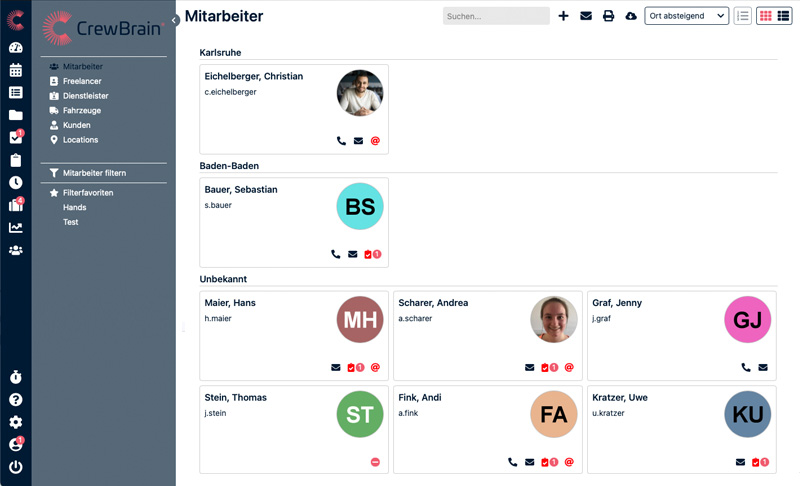 |
Grid viewBy default, users start in the grid view. This provides a quick overview of the most important information about the respective base data objects. In addition to the name and address, contact information is also available here. Small icons show additional information, such as missing certificates or similar, especially for staff. |
Table viewAt the top right of the base data, an icon can be used to switch to the table view. This view is fully configurable, so that the user can individually switch the desired columns on or off and change their sorting. The entire table can also be sorted according to various criteria. |
Filter base dataOn the left in the navigation it is possible to filter the individual base data. The filters function in the same way as the filters in the calendar (e.g. in the overviews); filter favourites are also automatically transferred. Thus, a saved filter, for example, according to a certain employee category, can be used both in the master data and in the calendar or statistics. |
Print view & exportBoth in the print view and in the export, the user can choose whether all fields or only the currently selected fields are to be exported. In this way, individual staff lists can be created, which can optionally also be based on a filter. |
Detailed viewsWe have also completely revised the detail views of the individual base data objects. These now open in a separate window, as is already known from projects, jobs and tasks. |
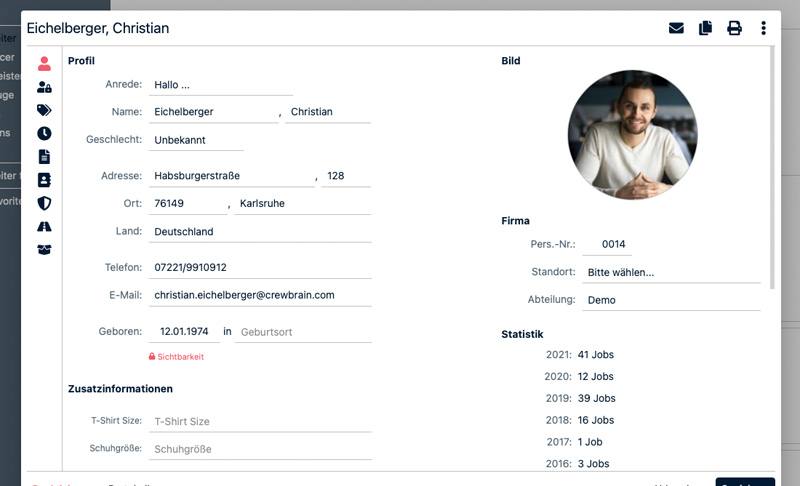 |
Organisation in TabsOn the left side of the base data dialogues are the individual tabs that can be used to access further information such as contact persons, categories or similar. |
Copy base dataIn future, many base data objects can simply be copied, and in some cases it is also possible to change the type. In this way, it is now possible, for example, to use a customer as a template for a location. Sub-objects such as contact persons can also be copied. |
New possibilitiesThe new base data dialogues offer new possibilities for data entry. Due to the better structuring, it was possible for us to now also make features available in the master data that were previously not available there. |
 |
Drivers logbookThe driver's logbook can now not only be viewed for both staff and vehicles, but also maintained or adjusted if necessary. Additional filters, for example on the time period as well as the vehicle or the driver, complement this functionality in the new base data dialogues. |
InspectionsIf work equipment is recorded for employees, inspections (e.g. safety checks or e-checks) can also be recorded for them in the system. If an inspection is created for several items of work equipment, in future it will also be possible to access these "collective inspections" via the base data. |
First aid bookUntil now, the association book was only accessible via the administration. Only there could the entries be viewed across the board. From now on, the first-aid book is available under the item "Occupational Safety" for each individual employee, so that one can quickly get an overview of entries by or for this person. |
Covid-19 testsLike the first-aid book, the Covid-19 tests (and vaccinations) can now also be accessed on a person-specific basis via the "Occupational safety" tab in the base data. The entry of new entries is now also possible in this way. |
Further optimisationsOf course, we have not only revised the base data but, as usual, also made other minor adjustments in the new version. |
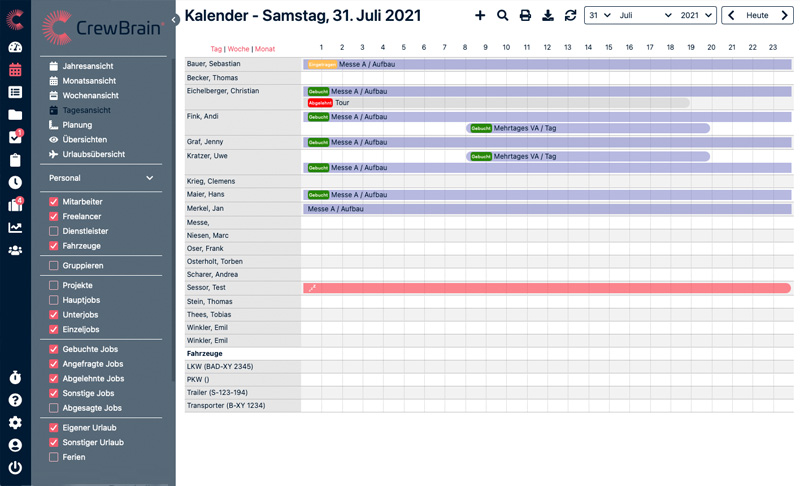 |
Day viewTwo new variants have been added to the daily view in the calendar: in addition to "Personnel", "Jobs" and "Time recording", there are now also "Dispatchers" and "Project managers". These views give a quick overview of all projects and jobs a project manager or scheduler is working on in a certain period. |
Locations for projectsA location can now also be stored for projects. This is automatically transferred to the main, sub and individual jobs for the project. If a project extends over several locations, however, the location should remain empty and instead be stored in the corresponding jobs. |
Job filterTwo options have been added to the job and appointment filters in the calendar. It is now possible to filter jobs or appointments that require staff or vehicles. |
CommentsWithin a job, comments can now be sent not only to all or to the dispatchers, but also to the project managers. |