Dear clients,
before the turn of the year we already announced the introduction of the new request dialog for January. We would like to keep this promise with this update info.
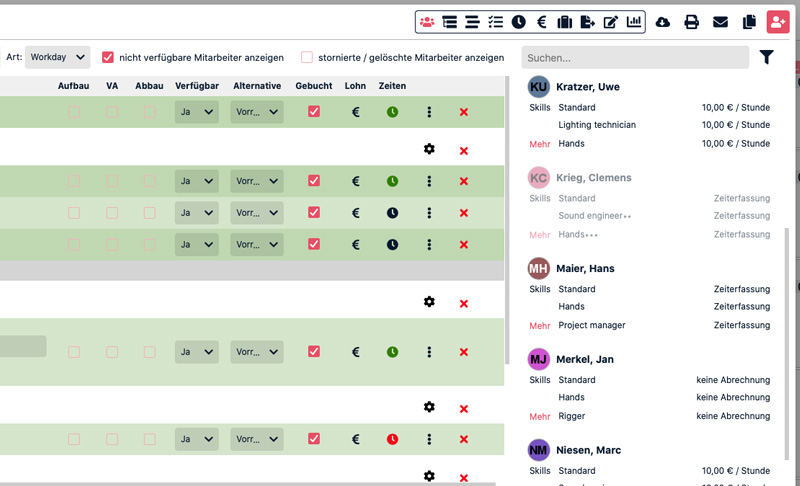
The new request dialog is particularly ideal for managing large lists of employees and freelancers. Using drag & drop, employees can be easily and flexibly assigned to jobs. At the same time, important information such as the price for freelancers, is displayed clearly and subdivided by category along with many more information.
The new request dialog is now available to all users, but must be activated individually. Notes on this and on the general use of the dialog can be found below.
I wish you continued success with CrewBrain
Sven Schlotthauer
The new request dialogOur new request dialog is available to all users. However, since it has significant differences from the previous dialog, it is available to users in parallel to our old request dialog. |
 |
Activate the new request dialogTo activate the new request dialog, every user has to activate a checkbox under "My Account" > "Settings". There is the option "use new request dialog". This choice must be made by all users, there is no automatic switch. For new users added to CrewBrain, the dialog is active by default, but can also be disabled under "My Account". |
Call up the new request dialogThe dialog is called up in the same way as the existing request dialog. Both the call in the job at the top right and the call for a special employee category are possible. However, the dialog no longer opens "above" the employee list of a job, but next to it. In this way, it becomes possible to drag and drop employees directly onto the desired categories or sub-jobs. |
Filter for employeesEmployees, Freelancers and subcontractors can be filtered as usual by categories, certificates and much more. The new request dialog also offers the possibility to save filter favorites. |
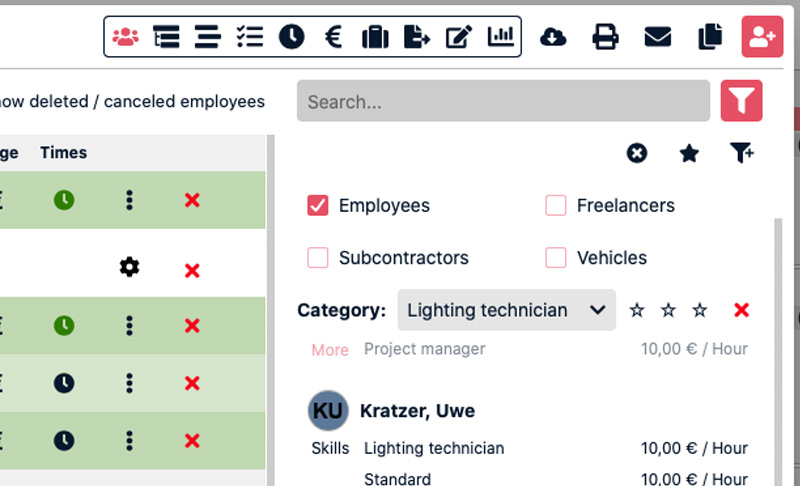 |
Select filtersTo filter the list of employees, click on the filter icon next to the large search field. Here you can first select which types (employees, freelancers, etc) should be searched. In addition, further filter options can be added via an icon (filter with a small "plus"). |
Combine filtersThe filters are "AND"-linked. This means that the list contains only those employees who match all search criteria. For example, you can select all employees who are assigned to the category "Technician" and have a specific certificate stored. |
Save filtersUsing the star icon you can save the current filter in the database. This way you can quickly recall an already used combination of search criterias at any time and search the list of employees for it. |
Schedule employeesAdding and scheduling employees, freelancers and subcontractors to jobs or sub-jobs is done with the new request dialog via drag & drop. This means that the way of working changes a bit in some places. |
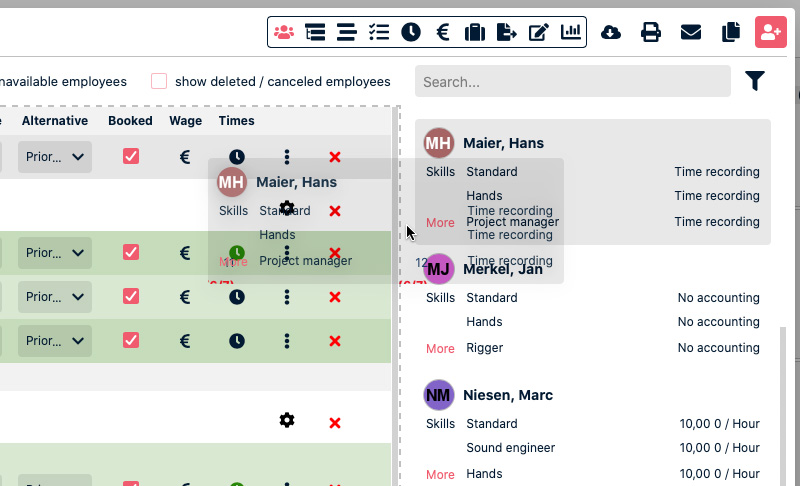 |
Employee listBy default, the request dialog is shown next to the employee list of a job or subjob. The desired employees can then be dragged from the request dialog into the employee list and placed in the correct category there. Depending on the position in the list (left, center, right) the employee is requested, entered or booked directly. This is displayed accordingly graphically in the list as target fields on mouse over. |
Subjob listIf a project or main job is planned with several sub-jobs, the request dialog can also be called directly from the list of sub-jobs. In this case, the employees can be distributed directly to the individual positions within the subjobs. If an employee is to be scheduled to several subjobs, it is recommended to use the personnel plan. |
Personnel planFrom the subjob list you can switch to the personnel plan in the upper right corner. This shows all subjobs as well as the employees and their assignment to the subjobs. New employees can be added to the matrix from the new request dialog as they can be in other lists. After that you can choose the desired subjobs for that employee. |
Sending e-mailsE-mails are no longer sent automatic with the new request dialog. This way you have the possibility to correct the position of the employees first via drag & drop before sending an request or booking email. |
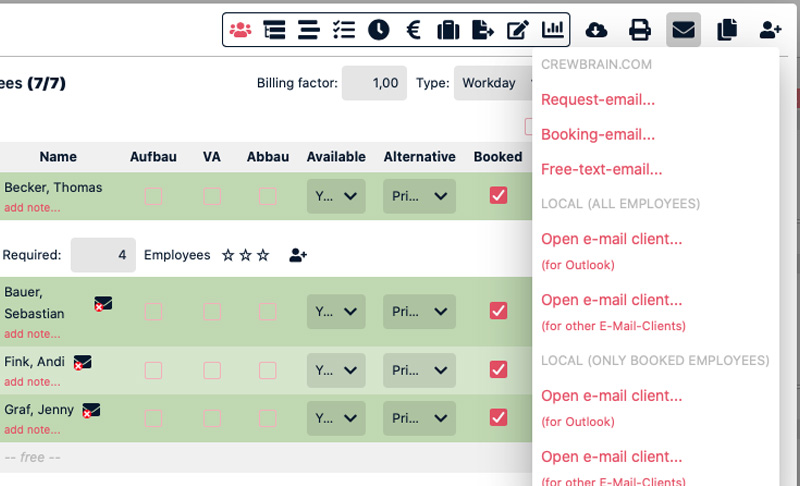 |
Request e-mailAt the top of the toolbar of a job or project you will find the letter icon, which you can use to send request mails. For each mail you can select to which employees it should be sent and insert an additional text. Only employees for whom no availability has been stored yet are displayed in the list. |
Booking e-mailThe same menu can also be used to trigger a booking email to the employees. In principle, this can be sent to all employees of a job (or also for all employees of all sub-jobs of a main job or project). If the employees are not yet marked as "booked", this will be done automatically when sending the e-mail. |
Your feedback is wantedIn order to further optimize the new request dialog, we are of course dependent on your feedback. Therefore, don't hesitate to send us hints and suggestions so that we can make CrewBrain even better together. |
 |
|
With the revision of the request dialog, we are simultaneously laying the foundation for future overarching calendar views. Thanks to the new filtering and display, the dialog is performant enough to be displayed outside of jobs – for example, in the planning view – even with large lists of employees or freelancers.
Since the new request dialog changes the way CrewBrain works in the request and booking area, the dialog is available in parallel to the existing dialog. This way it is possible to switch to the old dialog at any time. Currently there are no plans to remove the old dialog from the system. |
|